
By centralizing project governance, modern PPM platforms provide stakeholders with high-level visibility into financial health, timeline tracking, and team capacity. Drawing from extensive hands-on experience evaluating various PPM solutions, this guide analyzes the top-performing software on the market. Whether your organization prioritizes executive dashboards, rigid process standardization, real-time data updates, or robust enterprise-grade reporting, selecting the right software directly impacts your bottom line and strategic alignment.

Detailed Chronology and Comparative Breakdown
The evolution of project portfolio management tools reflects a broader shift toward automation, unified workspaces, and real-time data transparency. Over the past several years, PPM providers have moved away from static spreadsheets and cumbersome on-premise servers, favoring cloud-based, collaborative ecosystems equipped with artificial intelligence (AI) and automated provisioning.
Market Overview: Top PPM Software at a Glance
| PPM Software | Best For | Portfolio Management Features | Monthly Starting Price | Expert Rating |
|---|---|---|---|---|
| Wrike | Best executive dashboards | Program grouping, live KPI widgets, role-based controls | $10 per user | 4.84 / 5 |
| Smartsheet | Best for process standardization | Control Center, automated blueprints, global updates | $9 per user | 4.7 / 5 |
| ClickUp | Best for basic portfolio tracking | Portfolio cards, customizable columns, automated sync | $7 per user | 4.67 / 5 |
| Asana | Best for real-time portfolio updates | Nested portfolios, global custom fields, workload views | $10.99 per user | 4.66 / 5 |
| monday.com | Best custom portfolio boards | All Projects Dashboard, health snapshots, AI risk insights | $9 per user | 4.64 / 5 |
| Celoxis | Best for portfolio reporting | Scoring criteria, resource capacity views, What-If modeling | $10 per user | 4.51 / 5 |
| Planview | Best for enterprise PMOs | Demand management, strategic roadmapping, AI scenario planning | Custom | 4.22 / 5 |
Supporting Context & Deep-Dive Analysis
1. Wrike: Best Executive Dashboards (Rating: 4.84/5)
Wrike stands out as an exceptional choice for executive leadership requiring a consolidated, top-down view of organizational performance and resource distribution. The platform allows businesses to organize individual initiatives into overarching programs, tracking delivery metrics alongside financial data in real time.

- Why it shines: Wrike’s dashboard utilizes dynamic widgets that draw live data directly from the core workspace. Leaders can deploy pre-configured reporting modules—such as workload views, calendar heatmaps, and funnel charts—without manual data entry. Furthermore, granular permission controls allow executives to monitor high-level KPIs while enabling PMOs to drill down into project-specific details.
- Pros: Seamless transition between portfolio summaries and granular views; built-in proofing tools; robust folder structures.
- Cons: Rigid seat bundle structures; limited monthly automation credits compared to competitors; fewer native templates.
2. Smartsheet: Best for Process Standardization (Rating: 4.7/5)
For PMOs managing dozens of projects annually that require strict operational consistency, Smartsheet offers a powerful framework through its Control Center.
- Why it shines: Control Center uses automated templates called "blueprints" to spin up new projects. Every newly initiated project automatically inherits standardized sheets, reports, dashboards, and metrics, preventing teams from building workflows from scratch. Global updates ensure that adjustments made to template blueprints propagate across all active projects instantly.
- Pros: Comprehensive cross-portfolio reporting; unified integration of project, portfolio, and program tiers; uniform workflow enforcement.
- Cons: Limited flexibility for large-scale retrofitting of existing templates; portfolio tools incur extra fees on lower-tier plans; initial blueprint setup demands technical expertise.
3. ClickUp: Best Basic Portfolio Tracking (Rating: 4.67/5)
ClickUp bridges the gap between everyday task management and portfolio visibility through an AI-powered, highly flexible workspace.
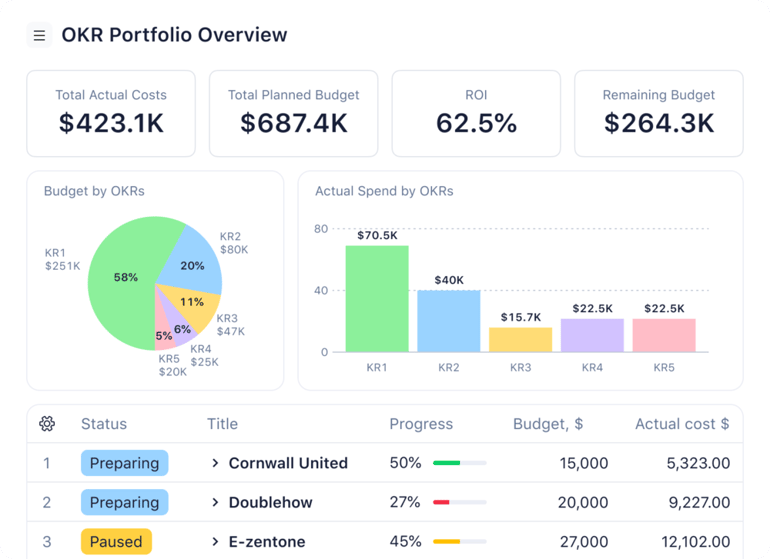
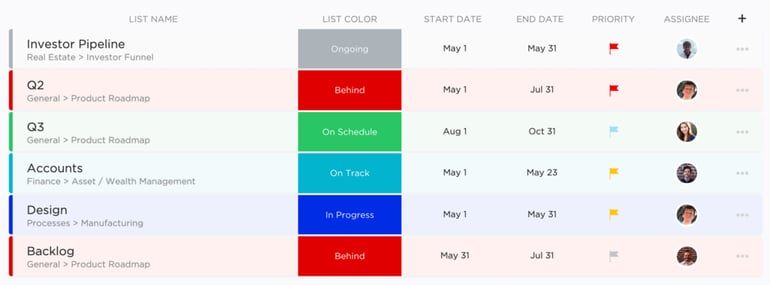
- Why it shines: ClickUp’s portfolio cards aggregate data from multiple folders and lists into a singular dashboard view. Users can track task completion counts, status flags, and project owners without complex multi-system setups. Data updates automatically, enabling quick cross-departmental reviews.
- Pros: Custom calculations on portfolio cards; ready-made portfolio templates; entry-level tier availability.
- Cons: Capped at 100 portfolio cards per dashboard; AI features require an independent subscription; portfolio cards lack column reordering and resizing flexibility.
4. Asana: Best for Real-Time Portfolio Updates (Rating: 4.66/5)
Asana’s portfolio management solution focuses heavily on immediate transparency, allowing teams to group projects and monitor health indicators seamlessly.
- Why it shines: Asana enables users to sort and filter projects by status, owner, or custom numeric fields (such as budget and billable hours). Nested portfolios, timeline visualizations, and real-time workload views help prevent burnout by identifying team capacity constraints before they escalate.
- Pros: Unlimited automation credits; rapid generation of portfolio status reports; quick onboarding of existing projects.
- Cons: Steep price jumps between paid tiers; lack of granular user seat caps; tasks restricted to a single assignee.
5. monday work management: Best Custom Portfolio Boards (Rating: 4.64/5)
monday.com delivers a deeply visual, highly adaptable portfolio management experience centered around customizable boards.

- Why it shines: The platform connects disparate project boards into an interactive portfolio view that updates dynamically. Features like the Portfolio Health Snapshot and AI-driven Portfolio Risk Insights allow organizations to proactively flag potential roadblocks across enterprise pipelines.
- Pros: Highly intuitive UI; rapid visual assessment of portfolio status; built-in Gantt charting.
- Cons: Core portfolio features locked behind high-tier plans; Enterprise subscription required for full functionality; complex seat bundle pricing.
6. Celoxis: Best for Portfolio Reporting (Rating: 4.51/5)
Celoxis is tailored for organizations that demand deep, analytical insights and robust financial reporting across all operational fronts.
- Why it shines: Celoxis features comprehensive built-in reporting tools that track budget allocations, schedule drift, cost overruns, and resource capacities. Its "What-If" scenario planning allows managers to simulate proposed project loads against current resource thresholds prior to formal approval.
- Pros: Unified budgeting, resource management, and portfolio intelligence; powerful What-If scenario modeling.
- Cons: Steep learning curve for advanced custom reports; interface can feel visually dense; potentially over-engineered for smaller teams.
7. Planview: Best for Enterprise PMOs (Rating: 4.22/5)
Planview is built specifically for enterprise-level PMOs navigating complex funding models, long-term strategic roadmapping, and large-scale project execution.
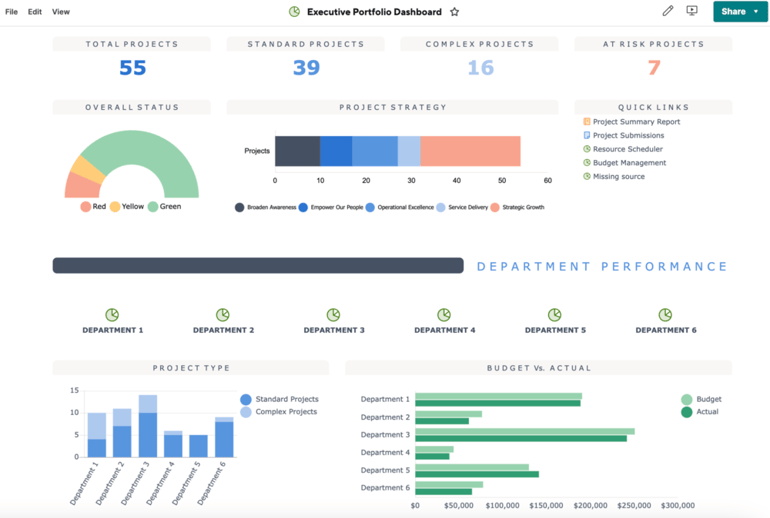
- Why it shines: Planview directly connects high-level business objectives to day-to-day project execution. It offers rigorous demand management, resource capacity planning, and AI-driven portfolio prioritization, empowering executives to model diverse financial outcomes before committing capital.
- Pros: Unmatched enterprise visibility; sophisticated AI prioritization; elite-tier financial tracking.
- Cons: Unpublished pricing structures; requires specialized technical deployment knowledge; excessive complexity for lean teams.
Evaluation Methodology
To determine the most effective project portfolio management software, a weighted evaluation rubric was applied, combining empirical data testing, vendor documentation analysis, and industry insights:
- Pricing (20%): Evaluation of cost transparency, tier structuring, free trials, and feature availability relative to entry- versus enterprise-level packages.
- General Features (25%): Assessment of foundational capabilities, including dashboards, project planning, resource allocation, budgeting, collaboration tools, and integrations.
- Advanced and Niche Features (20%): Credit awarded for sophisticated functionalities such as scenario modeling, demand forecasting, strategic roadmapping, and AI governance.
- Ease of Use (10%): Review of user interface design, onboarding efficiency, and workflow customization curves.
- Customer Support (10%): Analysis of live support channels, documentation depth, community forums, and response-time satisfaction metrics.
- Expert Score (15%): Comprehensive appraisal of product maturity, innovation velocity, and overall value delivered to multi-project environments.
Official Statements and Industry Insights
Industry analysts consistently emphasize that the divide between project success and failure often lies in governance standardization. According to leading enterprise PMO research, organizations that implement automated portfolio management tools experience a measurable reduction in project failure rates and budget overruns.

"The modern PMO cannot rely on static spreadsheets or disjointed communication silos," notes industry software evaluator and project management expert. "Enterprise resilience requires a centralized source of truth where financial planning, resource availability, and strategic milestones are updated concurrently."
Furthermore, software vendors are increasingly integrating predictive analytics. Modern executive statements from platforms like Wrike, monday.com, and Planview highlight an industry-wide pivot toward AI-assisted risk mitigation—allowing project managers to intercept bottlenecks before they impact overarching business goals.
Future Outlook
The landscape of project portfolio management software is poised for rapid transformation over the coming decade. As remote and hybrid work models mature, the demand for asynchronous, cloud-native collaboration will only intensify.
Key trends expected to shape the future of PPM tools include:

- Autonomous AI Agents: Moving beyond simple predictive alerts, future PPM solutions will likely feature autonomous agents capable of automatically reallocating resources, adjusting schedules, and drafting stakeholder status reports.
- Deeper ESG and Financial Integration: Organizations face increasing pressure to track not just financial return on investment (ROI), but environmental, social, and governance (ESG) metrics. Future portfolio software will incorporate sustainability scoring into project prioritization matrices.
- Unified Ecosystems: As the software stack expands, successful PPM tools will rely heavily on open API architectures to unify data across enterprise resource planning (ERP), customer relationship management (CRM), and software development lifecycle (SDLC) environments.
Organizations that invest in scalable, adaptable PPM platforms today will be best positioned to navigate future market uncertainties, maintain stringent governance, and successfully align daily execution with long-term enterprise vision.