


By centralizing project setup, offering high-level executive dashboards, and synthesizing resource allocation data, modern PPM platforms bridge the divide between high-level business strategy and ground-level task execution. Drawing from extensive, hands-on evaluations of various PPM systems in real-world governance structures, this comprehensive market analysis evaluates the top-tier project portfolio management tools available today. Whether your organization prioritizes executive reporting, stringent process standardization, or enterprise-grade scenario modeling, understanding the nuances of these platforms is essential for selecting a solution that matches your reporting requirements and overarching business goals.

Detailed Chronology and Market Evolution of PPM Software
The trajectory of project portfolio management software has shifted dramatically over the past two decades. Historically, organizations relied on localized spreadsheets and isolated desktop applications to track milestones, leaving executive leadership in the dark regarding true resource capacity and financial burn rates.
- The Early Blueprint Era: As businesses expanded globally, the initial wave of digital PPM tools focused primarily on isolated task tracking and basic Gantt charting. However, these tools lacked systemic connectivity, making it difficult to roll up department-level metrics into a coherent corporate strategy.
- The Integration and Automation Surge: Around the mid-2010s, platforms began integrating automated workflows, real-time status reporting, and cross-functional visibility. Solutions like Smartsheet and Wrike pioneered template-driven provisioning, enabling Project Management Offices (PMOs) to mandate uniform structures across multiple departments.
- The Modern AI and Real-Time Horizon: Today’s landscape is defined by predictive analytics, artificial intelligence-driven risk assessment, and real-time portfolio dashboards. Platforms like monday.com, Asana, and ClickUp have integrated machine learning to proactively flag resource constraints, forecast scheduling delays, and automate portfolio updates without manual human intervention.
Comprehensive Evaluation of Top PPM Software Solutions
1. Wrike: Best for Executive Dashboards
- Expert Rating: 4.84 / 5
- Starting Price: $10 per user/month
Wrike stands out as an exceptional project portfolio management solution for executives who require an unvarnished, consolidated view of project performance, financial health, and resource distribution. Its portfolio architecture allows enterprises to cluster individual projects into comprehensive programs, tracking progress via real-time status indicators and risk signals.

The platform’s dashboard ecosystem relies on dynamic widgets that pull live data directly from the core workspace. Out-of-the-box reporting components include workload heatmaps, KPI trackers, calendar views, and conversion funnels. Wrike also implements rigorous role-based access controls, ensuring that executive leadership can review high-level summaries while PMOs retain deep access to granular task data.
- Pros: Seamless switching between macro-level portfolio summaries and micro-level project views; robust built-in proofing and approval workflows; intuitive folder structures.
- Cons: Rigid seat bundles that can limit purchasing flexibility during headcount shifts; restricted monthly automation credits compared to competitors; fewer native templates out of the box.
2. Smartsheet: Best for Process Standardization
- Expert Rating: 4.7 / 5
- Starting Price: $9 per user/month
For PMOs launching dozens of distinct projects annually that demand strict adherence to standardized frameworks, Smartsheet is the gold standard. Its proprietary portfolio management tool, Control Center, leverages automated blueprints to spawn new projects that strictly replicate pre-approved sheets, reports, and dashboards.
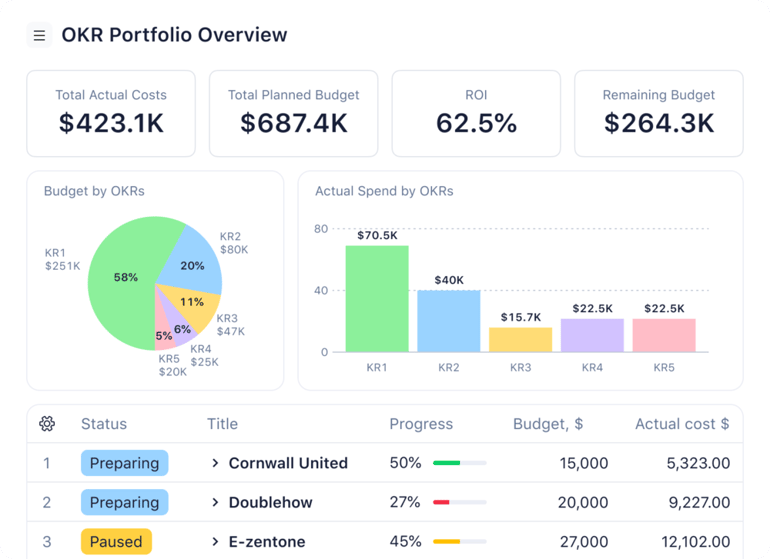
This automated provisioning ensures that teams never build project plans from scratch, safeguarding uniform workflows across the entire enterprise. Furthermore, global update capabilities allow administrators to push template adjustments to all active projects simultaneously, preserving process integrity even as corporate strategies evolve.
- Pros: Comprehensive reporting capabilities across an entire project portfolio; cohesive integration of project, program, and portfolio management; uniform workflow replication.
- Cons: Limited flexibility when executing large-scale structural changes to legacy templates; portfolio tools demand additional subscription fees on lower-tier plans; initial blueprint setup requires advanced technical fluency.
3. ClickUp: Best for Basic Portfolio Tracking
- Expert Rating: 4.67 / 5
- Starting Price: $7 per user/month
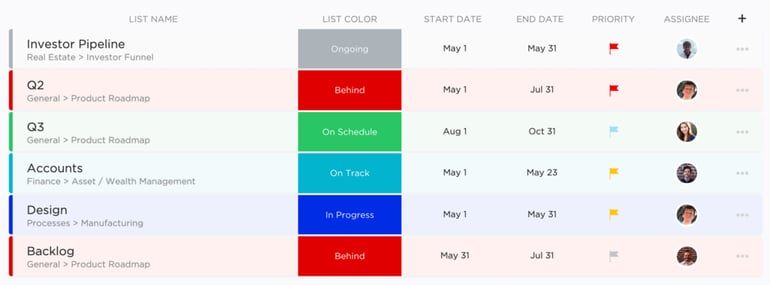
As an AI-enhanced workspace management tool, ClickUp delivers reliable, basic portfolio visibility without the steep learning curve often associated with enterprise solutions. Its portfolio cards allow managers to aggregate data from multiple Folders or Lists into a single dashboard table, presenting unified metrics on task counts, progress percentages, and designated owners.

Users can select specific project nodes to include, and the platform automatically calculates custom formulas and aggregates milestones. As team members check off deliverables in the field, portfolio views update instantaneously.
- Pros: Custom mathematical calculations available directly on portfolio cards; includes a ready-made portfolio template; core portfolio features accessible even at entry-level paid tiers.
- Cons: Dashboards are hard-capped at a maximum of 100 portfolio cards; AI functionalities require an additional subscription fee; portfolio cards lack column reordering and resizing capabilities.
4. Asana: Best for Real-Time Portfolio Updates
- Expert Rating: 4.66 / 5
- Starting Price: $10.99 per user/month
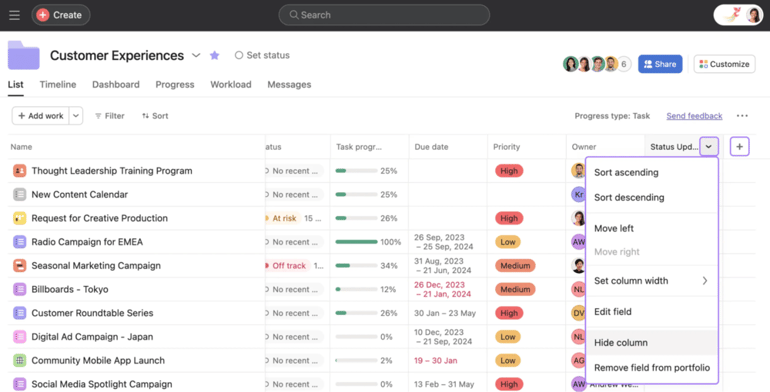
Asana’s portfolio management infrastructure is purposefully engineered to eliminate reporting lag. By establishing centralized portfolios, project managers can group disparate initiatives to monitor health, progress, timelines, and custom financial fields from a single dashboard.
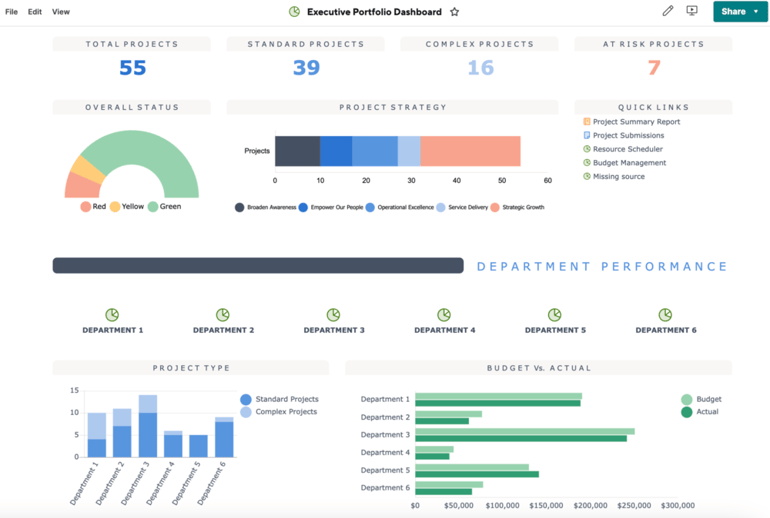
The platform supports nested portfolios and global custom fields, allowing organizations to roll up numeric metrics such as total budget expenditure, billable hours, and aggregate resource effort. Real-time timeline visualizations and team workload capacities keep all stakeholders informed as execution unfolds.
- Pros: Generous automation credit limits; immediate automated generation of portfolio health summaries; frictionless onboarding of existing projects.
- Cons: Steep price jumps between paid subscription tiers; lack of strict user seat limits can complicate forecasting; individual tasks remain restricted to a single assigned owner.
5. monday work management: Best Custom Portfolio Boards
- Expert Rating: 4.64 / 5
- Starting Price: $9 per user/month
Built on the foundation of highly flexible, visually engaging boards, monday.com adapts seamlessly to unique organizational workflows. It bridges multiple individual project boards into an interactive portfolio view that tracks real-time status, milestone timelines, and ownership matrices.

The platform’s All Projects Dashboard features prebuilt widgets that autonomously harvest data from every interconnected board. The Portfolio Health Snapshot presents task completion rates and variance between planned and actual schedules, while AI-powered Portfolio Risk Insights proactively scan connected boards to surface potential bottlenecks.
- Pros: Highly intuitive and visually appealing interface; rapid visual assessment of portfolio health; built-in, native Gantt charts directly within portfolio boards.
- Cons: Essential advanced management features are locked behind high-tier enterprise plans; seat-bundle pricing structures can be overly complex for mid-market buyers.
6. Celoxis: Best for Portfolio Reporting
- Expert Rating: 4.51 / 5
- Starting Price: $10 per user/month
Celoxis is tailor-made for organizations that treat data-driven reporting as a core operational competency. The platform features robust, native portfolio reports detailing budget allocation, schedule variances, cost overruns, and resource capacity constraints in both graphical and tabular formats.
Beyond static reporting, Celoxis introduces "What-If" scenario modeling. This capability empowers managers to simulate proposed project pipelines against current resource bandwidths, evaluating the financial and operational impact prior to formal budget approval.
- Pros: Unifies resource management, financial budgeting, and portfolio analytics into a single environment; powerful What-If scenario planning tools; exhaustive portfolio visibility.
- Cons: Steep learning curve for advanced custom report building; legacy interface design can feel cumbersome; overly robust for small, agile teams.
7. Planview: Best for Enterprise PMOs
- Expert Rating: 4.22 / 5
- Starting Price: Custom Pricing
Planview dominates the enterprise sector, offering an expansive PPM suite designed to harmonize business strategy, capital funding, and project execution across massive organizational portfolios. The platform builds a bridge between long-term corporate goals and ground-level delivery, offering deep visibility into fluctuating demand, multi-tier budgets, and human capital availability.

Integrated capacity planning maps out personnel skills and availability across hundreds of simultaneous initiatives, while AI-assisted analytics continuously monitor for enterprise-wide risk signals and performance drag.
- Pros: Unmatched enterprise-level oversight and visibility; sophisticated AI-driven project prioritization tools; granular, enterprise-grade financial tracking.
- Cons: Pricing is unlisted and requires bespoke enterprise negotiation; complex architecture demands dedicated technical administration; excessive overhead for smaller organizations.
Supporting Context & Evaluation Metrics
To provide an objective, authoritative assessment of these platforms, each tool was rigorously evaluated across a weighted evaluation rubric designed to reflect modern corporate governance needs:
- Pricing (20%): Evaluation of cost transparency, tier structuring, free-trial availability, and the strategic locking of core portfolio features behind enterprise paywalls.
- General Features (25%): Assessment of core PPM functionality, including executive dashboards, cross-project scheduling, baseline resource management, budgeting, and collaboration integrations.
- Advanced & Niche Features (20%): Credit awarded for sophisticated capabilities like scenario modeling, capacity forecasting, strategic roadmapping, AI analytics, and custom governance tools.
- Ease of Use (10%): Review of user interface design, onboarding friction, workflow customization flexibility, and training overhead.
- Customer Support (10%): Evaluation of vendor-provided support channels, documentation quality, training repositories, and community responsiveness.
- Expert Score (15%): Holistic qualitative assessment of product maturity, market reputation, recent functional improvements, and overall value proposition.
Official Statements and Industry Insights
Industry analysts continually emphasize that the failure of project management initiatives rarely stems from poor execution at the task level; rather, it originates at the portfolio level due to misaligned priorities and blind spots in resource allocation.
Representatives from leading PPM vendors note that the modern enterprise requires an ecosystem where operational data flows freely between disparate teams. As executive boards demand tighter fiscal controls in unpredictable economic climates, the integration of predictive AI analytics and automated financial roll-ups has transitioned from an experimental feature to a mandatory baseline expectation. Organizations failing to adopt centralized portfolio oversight risk funding redundant initiatives, burning out key human resources, and missing critical strategic windows.

Future Outlook
Looking ahead, the landscape of project portfolio management software will be heavily defined by hyper-automation, predictive resource modeling, and deeper integration with generative artificial intelligence. We can anticipate future iterations of PPM platforms moving beyond retroactive reporting into proactive orchestration—where algorithms autonomously reallocate tasks, adjust project timelines based on external market shifts, and dynamically balance workloads before human intervention becomes necessary.
For growing companies and established enterprise PMOs alike, the imperative is clear: investing in a scalable, robust PPM platform is no longer merely about organizing tasks. It is about building an agile, data-driven operational foundation capable of weathering market volatility and securing long-term strategic success.