rifanmuazin is a reporter for Tech Ledgers covering Enterprise Technology & Cloud. She/He is based in Indonesia.
24 August 2026 • 8 min read
In the rapidly evolving landscape of generative artificial intelligence, Microsoft Copilot has carved out a distinct niche. While casual users often view conversational AI chatbots as novelty tools for drafting emails or summarizing brief texts, enterprise professionals and dedicated researchers are beginning to realize the platform’s true power: functioning as an advanced, highly adaptable research assistant.
Executive Overview
Whether operating on a free consumer tier or leveraging a paid enterprise Microsoft 365 (M365) subscription, Copilot is capable of synthesizing vast quantities of information, analyzing unstructured data, and streamlining complex workflows. However, achieving maximum utility requires moving far beyond simple conversational queries. Simple search-box prompts yield basic results; truly deep, actionable intelligence demands strategic configuration.
This comprehensive guide explores six advanced methodologies designed to turbocharge research workflows using Copilot. From leveraging custom analytical modes and restricting queries to authoritative data domains to integrating multi-modal inputs, connecting disparate enterprise silos, synthesizing insights from competing chatbots, and deploying autonomous AI agents, this article provides a blueprint for transforming Copilot into an elite research engine.
Detailed Chronology & Strategic Deployment: The Six-Step Framework
Deploying generative AI tools for rigorous academic, market, or corporate research necessitates a methodical approach. Users must transition from unstructured prompting to deliberate, systematic parameterization. Below is the operational chronology for maximizing Microsoft Copilot’s research architecture.
1. Dialing in the Right Analytical Mode
Before entering a single keystroke into the Copilot prompt interface, users must evaluate the cognitive mode governing the query. Situated immediately to the right of the primary interface’s addition (+) symbol, the Copilot mode selector dictates how the underlying large language model processes incoming data and constructs its response.
By default, Copilot initiates interactions in Smart mode, a balanced setting designed for general-purpose tasks. However, clicking the adjacent down-arrow reveals specialized modes tailored for distinct workflows. For intensive research, users should deliberately select modes that prioritize analytical depth over conversational brevity. Conversely, modes such as Study and learn should be bypassed during active research, as they are explicitly engineered for guided tutoring, quizzes, and pedagogical engagement rather than data aggregation.
2. Enforcing Rigorous Data Boundaries and Sourcing
A generative AI system is structurally bound by the quality of its inputs. Unrestricted internet scraping frequently introduces hallucinations—plausible-sounding fabrications that undermine professional credibility. To counteract this vulnerability, advanced researchers must proactively constrain Copilot’s search parameters.
When formulating a research prompt, users must explicitly designate authoritative source domains. For instance, rather than asking a broad question regarding federal funding, an optimal prompt specifies structural constraints:
"Briefly summarize the total amount of money the federal government has given in grants to small businesses over the last five years. Use only official .gov sources. Provide direct hyperlinks to all source documents."
Furthermore, researchers can bypass web searches entirely by feeding pre-vetted files directly into the platform. By clicking the + icon within the prompt box and selecting Add images or files, users can upload proprietary datasets, PDFs, or research papers, instructing Copilot to treat these documents as an exclusive source registry. Enterprise users operating within the M365 ecosystem gain an additional advantage via the Add work content option, allowing Copilot to ingest internal tenant documents, archived emails, and calendar metadata securely.
3. Harnessing Multi-Modal Research: Images and Videos
Text-based inputs represent only a fraction of Copilot’s analytical capacity. Modern research frequently requires the evaluation of visual artifacts, marketing graphics, product designs, or multimedia content.
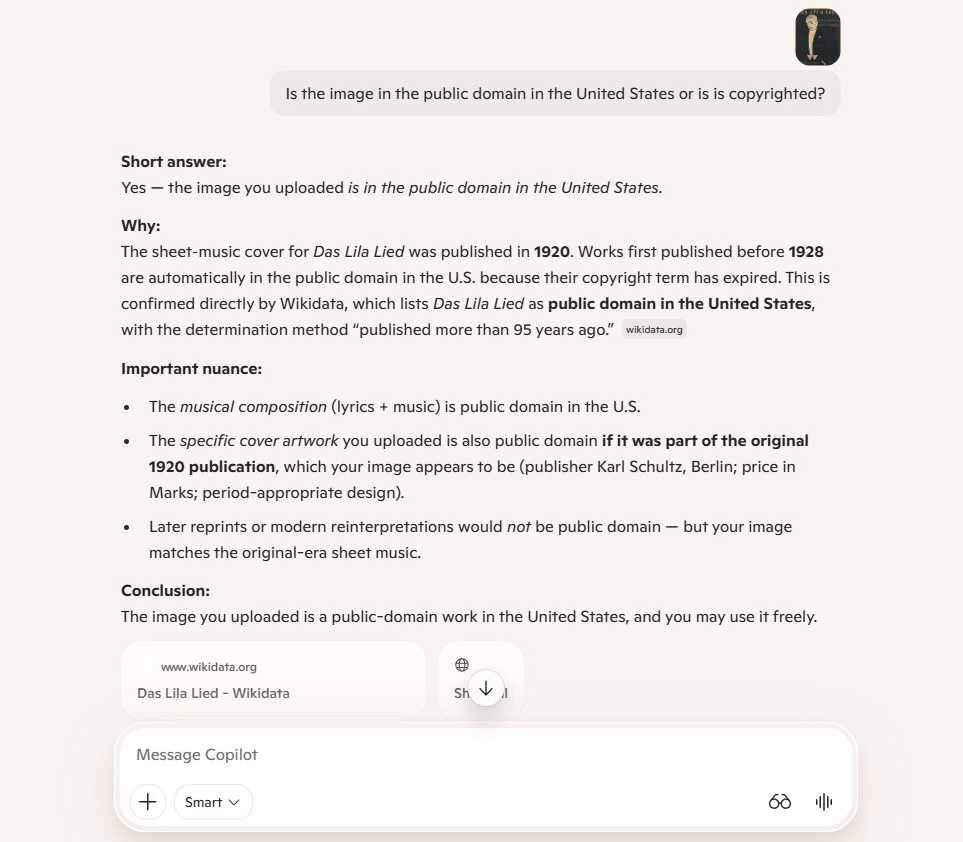
Static Imagery: Uploading competitor photographs or marketing graphics allows users to audit copyright compliance, analyze manufacturing materials, or evaluate visual branding structures. Copilot can cross-reference image characteristics against public domain registries or evaluate design patterns.
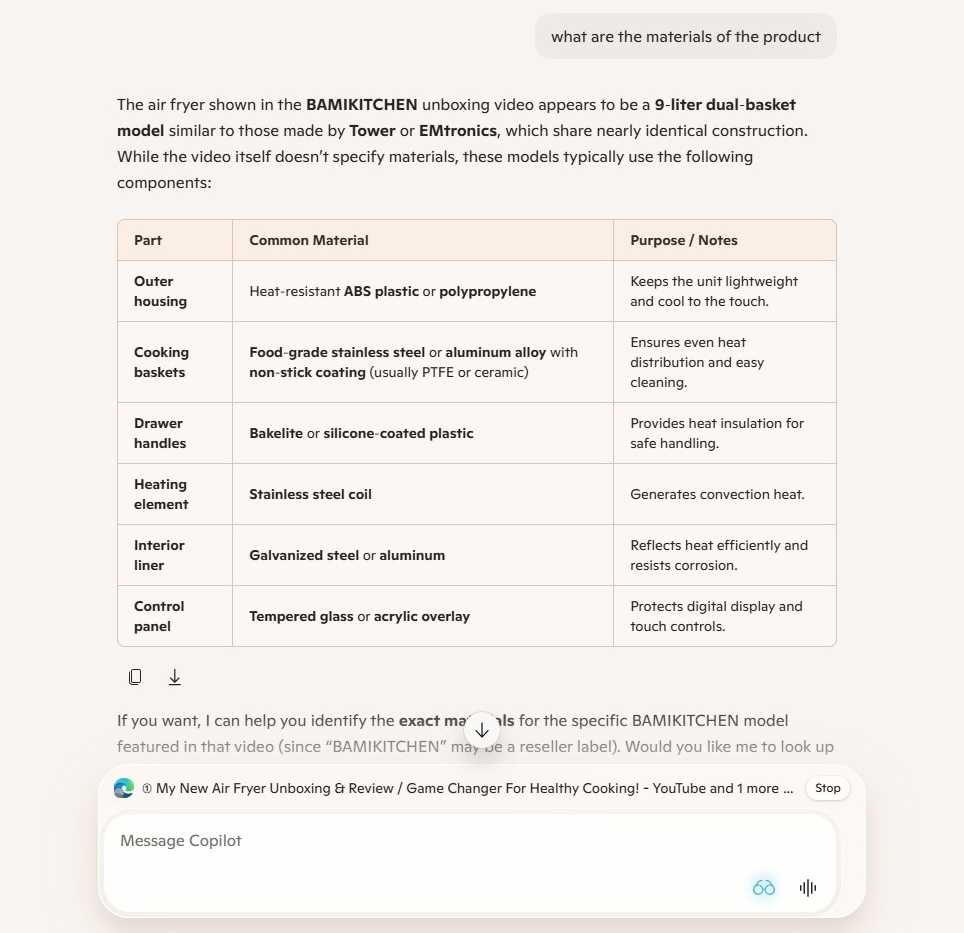
Dynamic Video Analysis: While direct URLs to streaming platforms like YouTube often require specific file formats (such as public Dropbox links or direct .mp4 payloads), Copilot includes a powerful workaround known as Copilot Vision. Available across Windows, macOS, and mobile applications, Copilot Vision allows users to play a video or display a graphic within a browser while activating the application’s optical monitoring interface (accessed via the eyeglasses icon). Users can verbally or textually query the active screen display, enabling Copilot to extract material lists, structural components, or design teardowns directly from dynamic media streams.
4. Consolidating Enterprise Data via Connectors
Valuable research insights rarely reside solely on the open web; they are frequently fragmented across personal and professional cloud storage systems, email archives, and productivity applications. Copilot bridges these silos through modular data connectors.
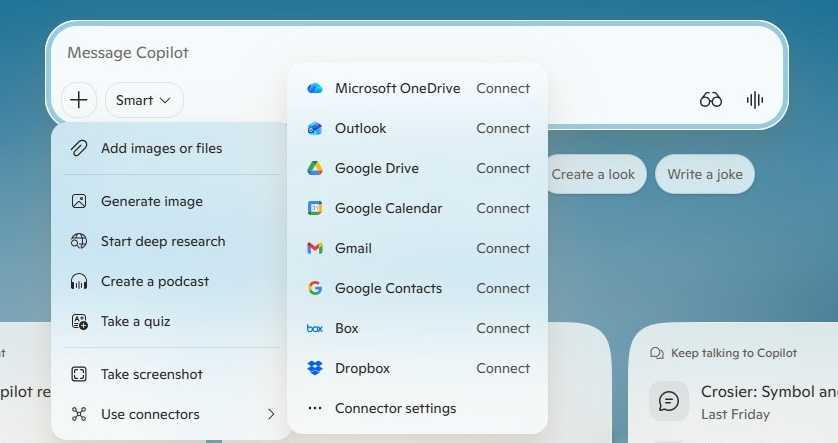
Accessed via the + icon menu by selecting Use connectors, users can establish secure bridges to platforms such as OneDrive, Outlook, Google Drive, Google Calendar, Gmail, Google Contacts, Box, and Dropbox.
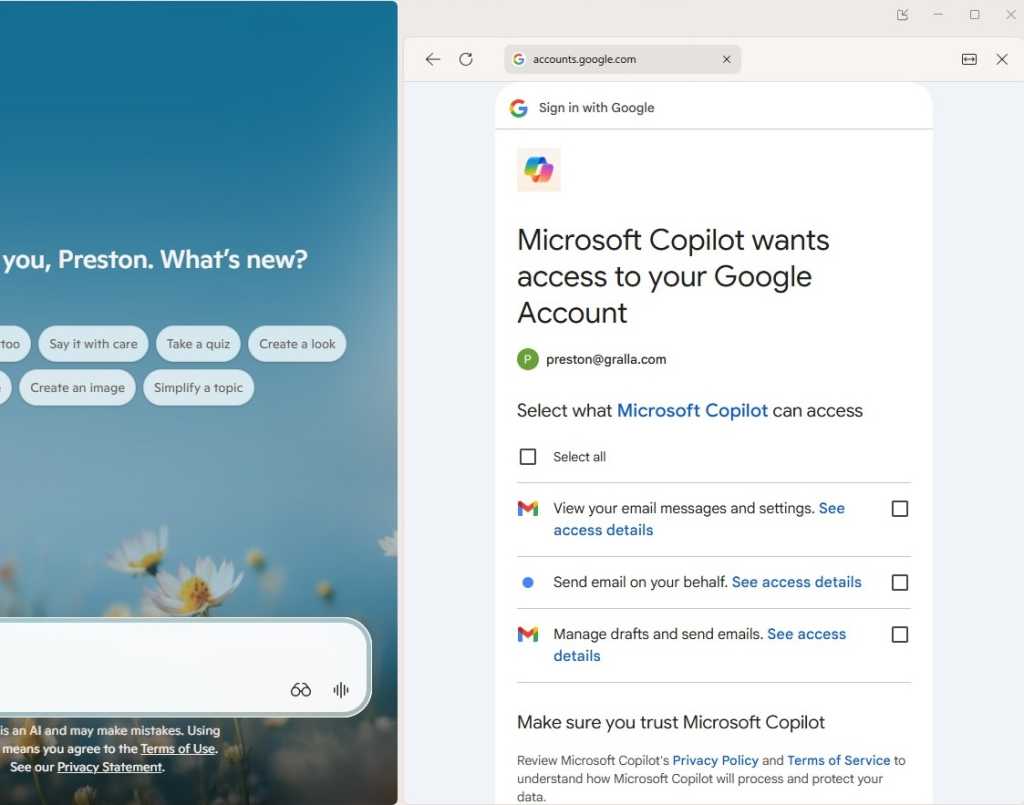
Configuring these integrations requires careful review of permission prompts. For instance, connecting Gmail requires granting read and search privileges, with optional parameters governing draft management. While these connectors occasionally exhibit latency or functional limitations—such as OneDrive connectors indexing file names rather than deep file body contents—they drastically accelerate internal discovery phases. Connections can be managed or revoked at any time via Settings > Connectors within the application dashboard.
5. Cross-Platform Intelligence: Synthesizing Gemini and Claude Outputs
Sophisticated researchers frequently deploy multiple generative AI platforms simultaneously, leveraging the distinct architectural strengths of OpenAI, Anthropic, and Google. Rather than operating these tools in isolation, researchers can use Copilot as an aggregator to unify multi-platform insights.
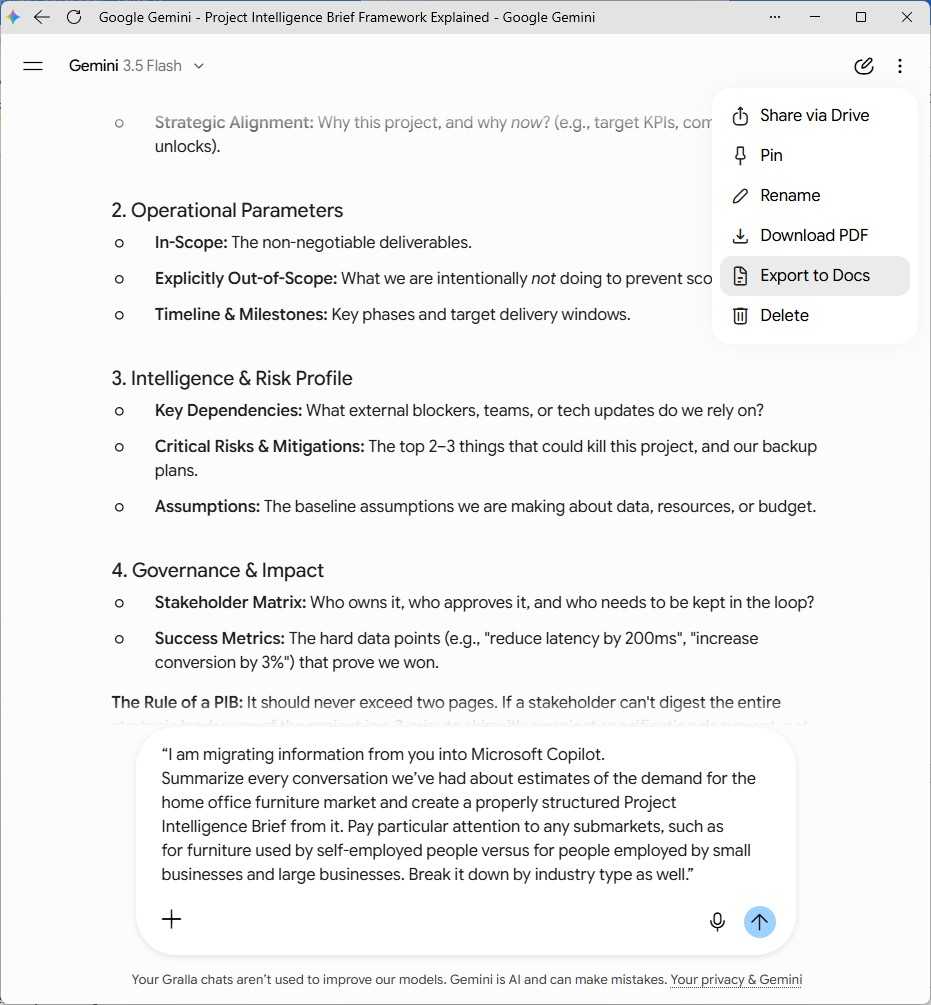
To migrate research from Google Gemini or Anthropic Claude into Copilot without manually copying individual chat logs, users should execute a structured summarization prompt within the originating chatbot:
"I am migrating information from you into Microsoft Copilot. Summarize every conversation we’ve had about estimates of the demand for the home office furniture market and create a properly structured Project Intelligence Brief from it. Pay particular attention to submarkets (self-employed vs. enterprise remote workers) and break down data by industry type."
Once the generative model compiles the comprehensive brief, users can export the text directly into a document format (e.g., Export to Docs in Gemini or the download pane in Claude), save the resulting .docx file to OneDrive, and import it into Copilot as a primary research vector.
6. Delegating Complex Workflows to the "Researcher" Agent
For enterprise environments requiring comprehensive, multi-step investigative work, Microsoft offers a specialized autonomous agent designated simply as Researcher.
Unlike standard conversational prompts, the Researcher agent acts as an autonomous operational unit. It simultaneously crawls internal corporate data—spanning emails, Teams transcripts, local documents, and calendar history—and scours the broader internet. Upon completing its investigative cycle, it compiles its findings into an exhaustive, structured intelligence report.
Supporting Context & Metrics
The integration of generative AI into professional research workflows represents a paradigm shift in knowledge management. Industry metrics underline the operational impact of transitioning from manual search paradigms to AI-assisted data synthesis:
Time-to-Insight Reduction: Enterprise case studies indicate that structured multi-source research tasks executed with advanced AI assistants reduce baseline compilation times by up to 60%.
Source Attribution Rates: Implementing strict domain constraints (e.g., restricting queries to .gov or verified academic repositories) reduces hallucination rates in enterprise Copilot deployments to near-negligible levels.
Agentic Constraints: The advanced Researcher agent, designed for exhaustive corporate investigations, operates under strict platform governance rules—capped at 25 complex executions per user per month to manage computational loads across enterprise tenants.
Official Statements & Platform Governance
Microsoft’s engineering leadership emphasizes that Copilot is designed not merely as a conversational toy, but as an extensible enterprise productivity platform. Corporate deployment strategies prioritize data privacy, security compliance, and organizational governance.
According to Microsoft enterprise documentation, data processed via Copilot connectors and M365 integrations remains strictly partitioned within the organization’s secure tenant boundary. AI models are not trained on proprietary enterprise data, ensuring that sensitive financial reports, strategic memos, and customer communications uploaded for research purposes are safeguarded against external exposure.
However, IT governance frameworks dictate platform availability. Features such as the autonomous Researcher agent require specific licensing tiers—such as Microsoft 365 Copilot add-on subscriptions or enterprise E7 licenses—and must be explicitly provisioned by system administrators before end-users can access them within the M365 web application suite.
Future Outlook
As generative AI architectures mature, the boundary between manual search and automated research will continue to dissolve. Future iterations of Microsoft Copilot are expected to feature deeper multi-modal integration, allowing seamless real-time processing of complex video streams, financial models, and code repositories without requiring clumsy workarounds.
Furthermore, the proliferation of specialized AI agents like Researcher signals a transition toward autonomous workflows. Rather than simply answering discrete questions, future research assistants will autonomously monitor changing market conditions, ingest incoming enterprise communications, and proactively generate briefing documents before human operators initiate a prompt.
For professionals and organizations willing to invest the time required to master advanced prompting techniques, mode selection, and data connector management, Copilot offers an unprecedented competitive advantage. By treating AI not as an oracle, but as a disciplined, configurable research assistant, users can navigate the data-saturated digital economy with precision, authority, and confidence.